










FoneTool Repair for Windows
- Free
- 4.2
- 39
- V1.5.0
Free Download for Windows
View an ad to download for free

- AOMEI
- More programs (20)
Easily fix iOS/iPadOS issues
FoneTool Repair Review
What Is FoneTool Repair?
FoneTool Repair is an iOS system repair tool for Windows. It helps users troubleshoot software-related problems on iPhone, iPad, and iPod touch without requiring advanced technical skills.
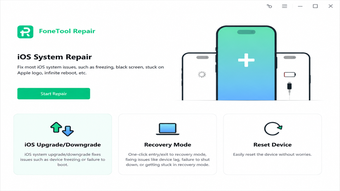
The program can repair common issues such as black screens, frozen devices, boot loops, failed updates, Apple logo loops, and recovery mode errors. It also provides tools for upgrading or downgrading iOS, managing Recovery and DFU modes, and resetting Apple devices.
Key Features
iOS System RepairFixes black screens, boot loops, frozen devices, update failures, and other common iOS or iPadOS problems.
Standard and Deep Repair ModesStandard Mode attempts to repair the system while preserving data. Deep Mode performs a more complete repair but erases device data.
iOS Upgrade and DowngradeInstalls a compatible iOS or iPadOS version without iTunes or jailbreaking. Available versions depend on device compatibility and firmware availability.
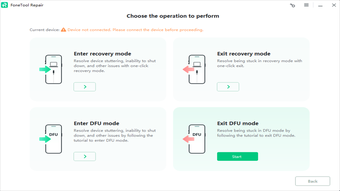
Recovery and DFU Mode ManagementHelps users enter or exit Recovery Mode and provides guided instructions for DFU Mode.
Device ResetOffers a standard reset that keeps data and an advanced factory reset that erases the device.
Wide Device CompatibilitySupports compatible iPhone, iPad, and iPod touch models running iOS or iPadOS 9 and later.
How It Works
Install FoneTool Repair on a Windows computer.
Connect the Apple device with a USB cable.
Select Repair, Upgrade/Downgrade, Recovery Mode, or Reset Device.
Download the required firmware when prompted.
Follow the instructions and keep the device connected until completion.
Users should back up important data before performing a repair, downgrade, or reset.
System Requirements
Windows 11, 10, 8.1, 8, or Windows 7 SP1
Compatible 32-bit and 64-bit editions
1 GHz x86-compatible processor
At least 256 MB of RAM
Approximately 300 MB of available storage
Internet connection for firmware downloads
Compatible iPhone, iPad, or iPod touch
Free and Premium Versions
FoneTool Repair can be downloaded and evaluated for free. Some repair operations or full functionality may require a Professional license. A Professional license currently supports up to five iOS devices on one Windows PC. Features and licensing terms may vary by version.
Limitations
Deep Repair and advanced factory reset erase device data.
Downgrading depends on compatible and available firmware.
Some operations require the device to be unlocked and authorized.
Activation Lock may still require the original Apple Account credentials.
The software cannot repair physical hardware damage.
What’s New in Version 1.5.0
Version 1.5.0 added Recovery and DFU Mode management, introduced device-reset options, and improved the interface and operating workflow.
Conclusion
FoneTool Repair provides an accessible way to fix iOS system problems, exit recovery mode, upgrade or downgrade iOS, and reset Apple devices from a Windows PC. It is useful for users searching for an iOS repair tool, iPhone recovery mode utility, iOS downgrade software, or iPadOS repair solution.
Loading…
App specs
Developer
- AOMEI
- More programs (20)
License
Free
Version
1.5.0
Latest update
Platform
Windows
OS
Windows Server
Language
English
Downloads
39
Last month's downloads
- 39
Size
134.34 MB
FoneTool Repair for PC
- Free
- 4.2
- 39
- V1.5.0
Free Download for PC
View an ad to download for free
User reviews about FoneTool Repair
Have you tried FoneTool Repair? Be the first to leave your opinion!
Add reviewTop downloads Utilities & Tools for Windows
Top downloads Utilities & Tools for Windows
Top downloads Utilities & Tools for Windows
Related topics about FoneTool Repair
Latest articles

Tesla renames Full Self-Driving in Europe: Assisted Driving appears on EU sites

Microsoft updates its AI push with “Super Intelligence”: against OpenAI and Anthropic

Microsoft Outlook retires Themes by Copilot this October

Over the Garden Wall is back in Prime Video’s Top 10 for Halloween

Doctor Who card game returns October 26: Battles in Time becomes Circuit Breaker
Laws concerning the use of this software vary from country to country. We do not encourage or condone the use of this program if it is in violation of these laws. Softonic may receive a referral fee if you click or buy any of the products featured here.